POWERSHELL

PowerShell Ile Active Directory Domain Services Kurulumu

Merhaba, Bu makalemde sizlere Powershell üzerinde Active Directory Domain Services (AD DS) kurulumu gerçekleştireceğim.

ilk başta ortama 2 sunucu hazırlıyorum. DC1 ve DC2 olacak şekilde kurulumu gerçekleştireceğiz.Standart kurulumun altında bir sürede  Active Directory Domain Services kurabiliyoruz.
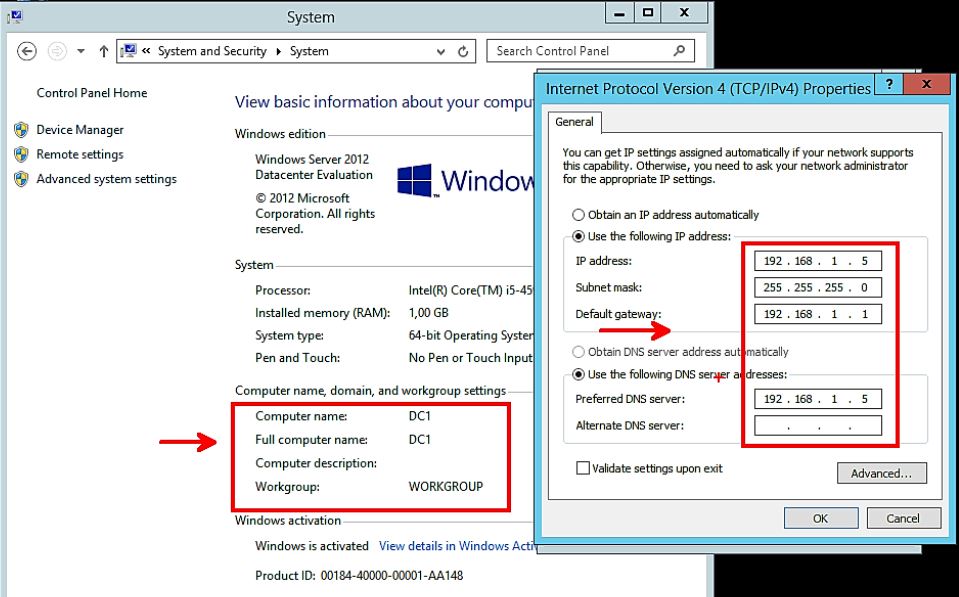

Kuruluma geçmeden önce standart olarak sabit bir İP ve sunucu ismimi düzenliyorum.


Görev çubuğundaki “Windows Powershell” sağ click yaparak “Run as Administrator” olarak açıyorum.
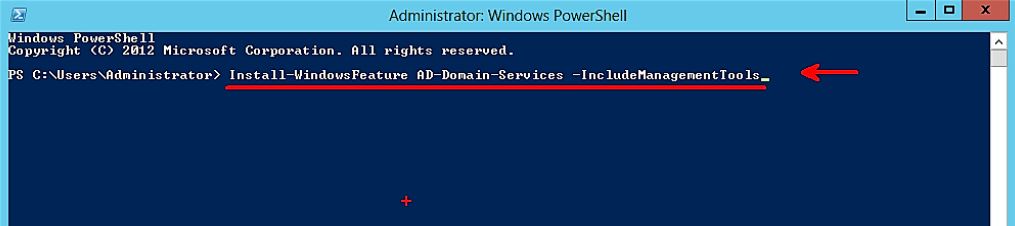

>Install-WindowsFeature AD-Domain-Services -IncludeManagementTools

Install-ADDSForest -DomainName erbulmus.com

Komutunu çalıştıyoruz.ortamımıza kuracağımız AD DS servisimizi çalışıtıyoruz.


Active Directory Domain Services (AD DS) kuruldu.  Şimdi servisimizi “Promote” etmemiz gerekiyor

>Install-ADDSForest -DomainName erbulmus.com

Yukaridaki komut ile “Promote” ederiyoruz.
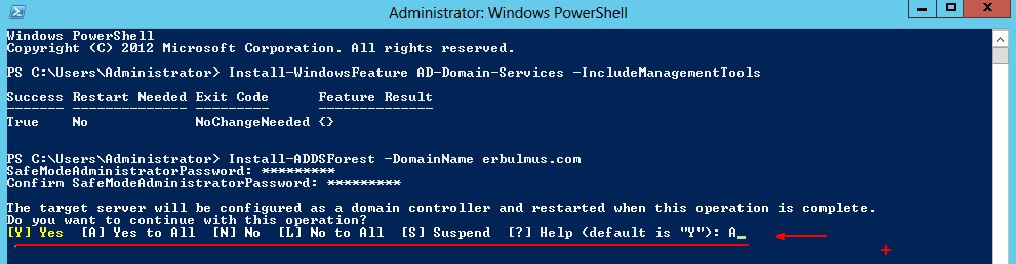

“ALL” diyerek erbulmus.com DC ‘mizi kuruyoruz. Komuttan sonra DC makinamız “Restart” edecektir.
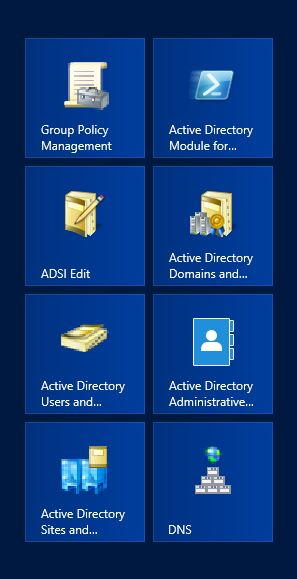

Active Directory Domain Services (AD DS) başarılı bir şekilde kurulmuştur.
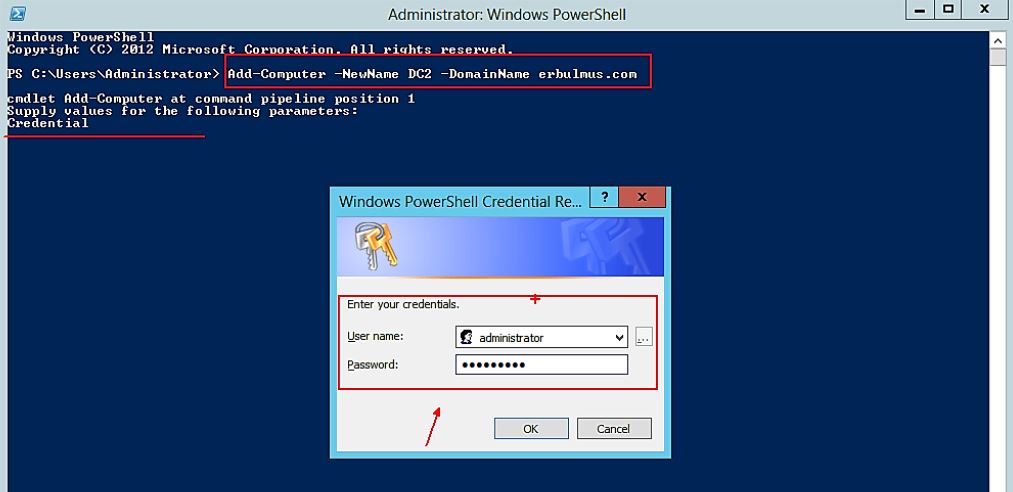

>Add-Computer -NewName DC2 -DomainName erbulmus.com

Yukaridaki komut ile  sunumuza “DC2” ismi veriyoruz ve “erbulmus.com” domaine dahil ediyoruz.

Kullanıcı adı ve şifremizi girdikten sonra sunucumuzu “Restart” ediyoruz. DC2 isimli sunucumun erbulmus.com domaini içinde olmuş oluyor.

Teşekkürler.

I was born in Istanbul. I completed my high school education in system network engineering, my university studies in Computer Technology and Programming Sciences, and earned a four-year degree from Anadolu University. As an experienced technology consultant, I have gained extensive experience in the field of information technology for over 10 years. I have worked in both large corporate companies and small-scale startups, specialising in providing strategic technology solutions to clients across various industries. During this time, I have developed into a determined and reliable IT consultant, covering the entire technology field, including project management, training, and pre- and post-sales support for corporate solutions. I have both individual and team-based experience in management, implementation, and design in areas such as cybersecurity, endpoint security, data security, cloud migration, and infrastructure. As a result, I always use the phrase “It can be better” in every situation I encounter. I currently work as a “Cyber Security Principal Expert ☁” at Koçsistem, Microsoft’s top partner. My skills and abilities Cloud Computing Architecture Microsoft 365 Migration and Management Azure Infrastructure Modern Workplace Digital transformation Microsoft 365 Exchange Online EOP ( Exchange Online Protection) Microsoft Defender for Office 365 Microsoft Defender for Endpoint Microsoft Defender for Cloud Apps Microsoft Defender for Cloud Microsoft Defender for Identity Microsoft Intune Microsoft Sentinel Microsoft Teams Hybrid Solutions Mobile Device Management and Mobile Application Management. Data Loss Prevention and Protection Microsoft Information Protection Cloud Identity and Access Management Solution MS Windows Server Family Microsoft Client Windows 11 Management of Hyper-v and VMware Virtualization Platforms Active Directory configuration and management Exchange Server configuration and management Veeam Backup installation and configuration WDS,MDT configuration and management Certificates ; MCT: Microsoft Certified Trainer 2019-2020 MS: Designing and Providing Microsoft Volume Licensing Solutions to Large Organizations MCTS: Designing, Assessing, and Optimizing Software Asset Management (SAM) MCPS: Microsoft Certified Professional MCSA: Windows Server 2012 MCSE: Private Cloud WMSP: Veeam Sales Professional VMTSP: Veeam Technical Sales Professional Coursera-Cybersecurity Solutions and Microsoft Defender Coursera-Cybersecurity Management and Compliance Google – Google Professional Cloud Architect

Bir yanıt yazın

E-posta adresiniz yayınlanmayacak. Gerekli alanlar * ile işaretlenmişlerdir