MİCROSOFT AZURE

Azure Advanced Threat Protection (Azure ATP) Bileşenleri ve Mimarisi Part-2

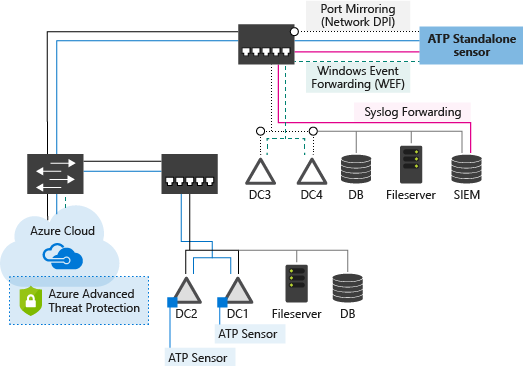
Azure ATP Mimarisini aşağıdaki resimde inceleyebilirsiniz.


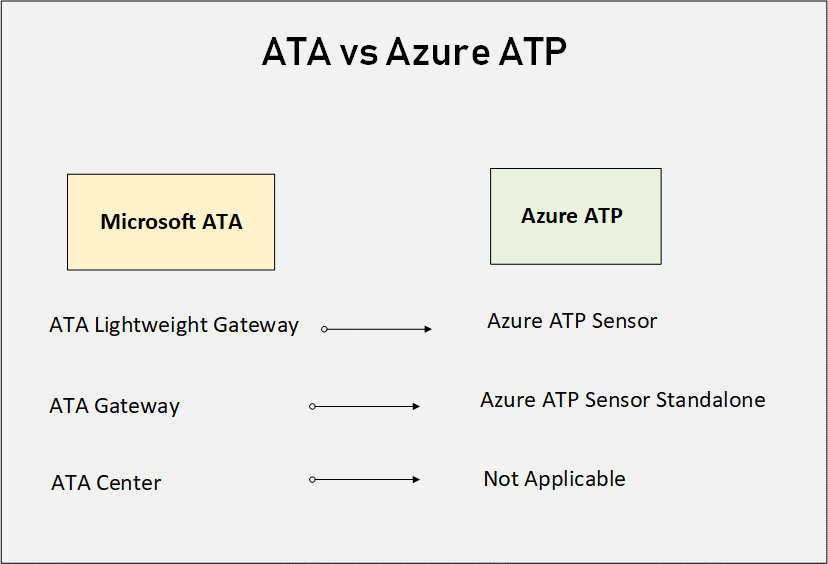
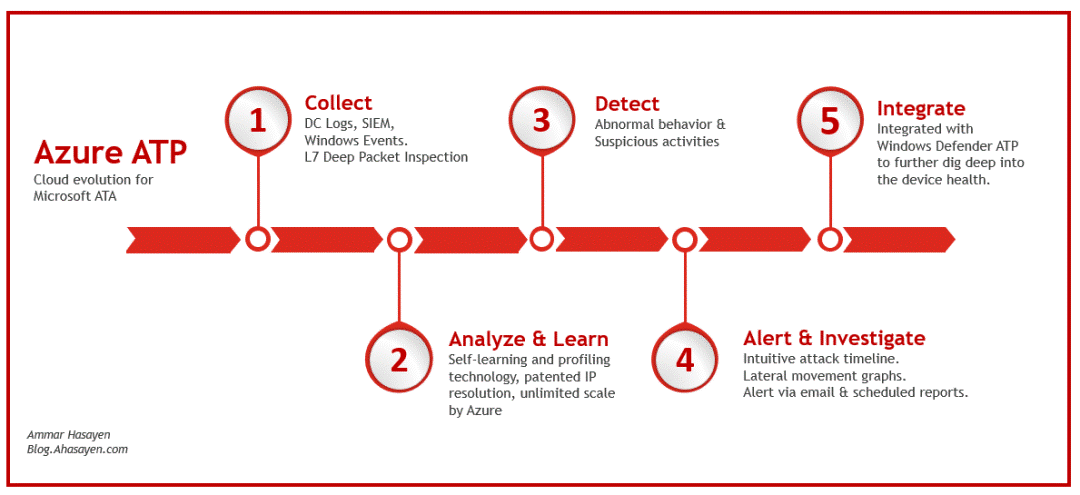
Azure ATP standalone sensoru, fiziksel veya sanal switch’ler kullanarak (Port Mirroring) domain ortamınızdaki ağ trafiğini izlemektedir. Yada Domain controller sunucusuna Azure ATP sensorünü kurduğunuzda doğrudan event log’lara erişim sağlayabilirsiniz. Bu sebeple network ağınızda herhangi configurasyon yapmanıza gerek kalmayacaktır. Bu iki seceneği de ortamınızda konumlandırabilirsiniz. Bununlarla birlikte toplanan logs ve event’larınızı Windows Event Forwarding (WEF) veya SIEM entegrasyonu üzerinden Azure ATA ye gönderebilirsiniz.

Not: Default olarak, en fazla 100 Azure ATP sensorü desteklemektedir.

Azure ATP’i oluşturan bileşenler aşağıdaki gibidir.

  • Azure ATP workspace management portal
  • Azure ATP workspace portal
  • Azure ATP sensor
  • Azure ATP standalone sensor

Azure ATP Yönetim Portalı ve Çalışma Alanı Portalı gereksinimleri

Azure ATP yönetimi ve çalışma portalına erişim aşağıdaki tarayıcıları ve ayarları desteklemektedir.

  • Microsoft Edge
  • Internet Explorer sürüm 10 ve üstü
  • Google Chrome 4.0 ve üstü
  • Minimum ekran genişliği çözünürlüğü 1700 piksel olmalı
  • Güvenlik duvarı/proxy Azure ATP bulut hizmetiyle iletişim kurmak için açık olması gerekir: *. güvenlik duvarı/proxy’de atp.azure.com bağlantı noktası 443‘tür.

Azure ATP standalone sensor gereksinimleri

Azure ATP standalone sensor Windows Server 2012 R2 veya Windows Server 2016 çalışan sunuculara yüklemeyi desteklemektedir. Standalone sensor domain veya workgroup olan bir sunuculara da yüklenebilir.

Azure ATP sensor gereksinimleri

Azure ATP sensor Windows Server 2008 R2 SP1, Windows Server 2012, Windows Server 2012 R2, Windows Server 2016 çalıştıran domain üzerine yüklemeyi desteklemektedir. Domain Controller read-only domain controller (RODC) olabilir. Yükleme sırasında .net Framework 4.7 yüklenir ve yükleme sonrasında sunucuyu yeniden başlatmak gerekir. Azure ATP sensor en az 2 CPU ve 6 GB RAMgerektirir.

AZURE ATP CAPACITY PLANNING

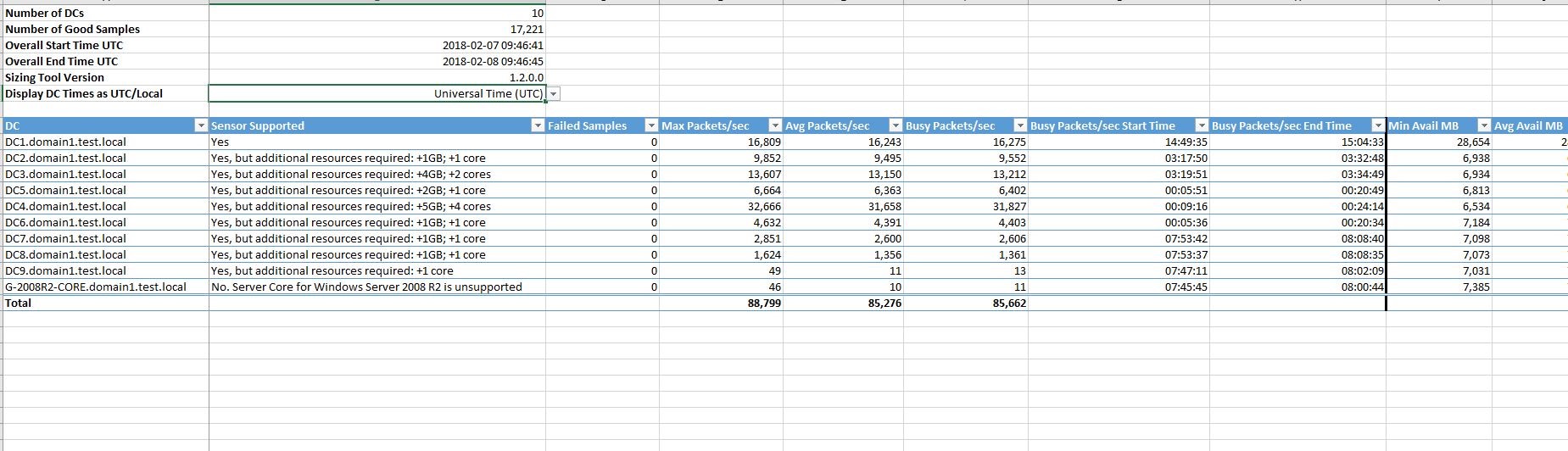
AZURE ATP korumasını ortamınıza dahil etmeden önce, Azure ATP kapasite planlaması yapılması gerekir. Azure ATP kapasitesini belirlemenin en basit ve önerilen yolu, Azure ATP Sizing Tool ‘unu kullanmaktadır. Bu tool’u çalıştırdığınızda size bir excel raporu sunmaktadır. Bu rapor içinde sunucunun CPU ve RAM degerleri belirlenmektedir. Bu degerlere göre Azure ATP sensorünü kullanmanız önerilir.

I was born in Istanbul. I completed my high school education in system network engineering, my university studies in Computer Technology and Programming Sciences, and earned a four-year degree from Anadolu University. As an experienced technology consultant, I have gained extensive experience in the field of information technology for over 10 years. I have worked in both large corporate companies and small-scale startups, specialising in providing strategic technology solutions to clients across various industries. During this time, I have developed into a determined and reliable IT consultant, covering the entire technology field, including project management, training, and pre- and post-sales support for corporate solutions. I have both individual and team-based experience in management, implementation, and design in areas such as cybersecurity, endpoint security, data security, cloud migration, and infrastructure. As a result, I always use the phrase “It can be better” in every situation I encounter. I currently work as a “Cyber Security Principal Expert ☁” at Koçsistem, Microsoft’s top partner. My skills and abilities Cloud Computing Architecture Microsoft 365 Migration and Management Azure Infrastructure Modern Workplace Digital transformation Microsoft 365 Exchange Online EOP ( Exchange Online Protection) Microsoft Defender for Office 365 Microsoft Defender for Endpoint Microsoft Defender for Cloud Apps Microsoft Defender for Cloud Microsoft Defender for Identity Microsoft Intune Microsoft Sentinel Microsoft Teams Hybrid Solutions Mobile Device Management and Mobile Application Management. Data Loss Prevention and Protection Microsoft Information Protection Cloud Identity and Access Management Solution MS Windows Server Family Microsoft Client Windows 11 Management of Hyper-v and VMware Virtualization Platforms Active Directory configuration and management Exchange Server configuration and management Veeam Backup installation and configuration WDS,MDT configuration and management Certificates ; MCT: Microsoft Certified Trainer 2019-2020 MS: Designing and Providing Microsoft Volume Licensing Solutions to Large Organizations MCTS: Designing, Assessing, and Optimizing Software Asset Management (SAM) MCPS: Microsoft Certified Professional MCSA: Windows Server 2012 MCSE: Private Cloud WMSP: Veeam Sales Professional VMTSP: Veeam Technical Sales Professional Coursera-Cybersecurity Solutions and Microsoft Defender Coursera-Cybersecurity Management and Compliance Google – Google Professional Cloud Architect

Bir yanıt yazın

E-posta adresiniz yayınlanmayacak. Gerekli alanlar * ile işaretlenmişlerdir